

Download ReadPlease 2003 – text to speech, microsoft speech, read aloud, freeware, tts, readplease
Overview
ReadPlease 2003 is a text-to-speech (TTS) utility designed to convert written content into spoken words using Microsoft speech engines. The application was developed as freeware, offering users a no-cost solution for listening to text rather than reading it manually. Its primary purpose is to assist individuals who benefit from auditory learning, those with visual impairments, or users seeking multitasking capabilities while consuming written material. The app supports basic text input through clipboard integration, allowing users to paste content into the main interface for immediate playback.
Despite its simplicity, ReadPlease 2003 addresses a fundamental need in digital accessibility: enabling users to access written information through audio. It is particularly relevant for individuals who require support in reading comprehension or who wish to reduce eye strain during prolonged reading sessions. However, the app’s release date in 2003 suggests it was designed for an older computing environment, which may affect its compatibility with modern systems. The developer, ReadPlease, did not provide additional technical details about the app’s design philosophy or target audience beyond its core functionality.
Real-world use cases include listening to articles, documents, or notes while performing other tasks, such as cooking, walking, or commuting. While the app fulfills a niche role in the productivity and accessibility ecosystem, its outdated nature and limited feature set reduce its relevance in today’s market. The developer did not specify minimum OS requirements, and compatibility with current operating systems remains uncertain.
Key Features & Functionality
- Text-to-Speech Conversion: The app uses Microsoft speech engines to read selected text aloud. Users can copy any text and paste it into the application window, where it will be spoken in real time.
- Four Built-in Voices: The application provides four voice options, though no further details are available on voice types or regional accents.
- Clipboard Integration: Text can be pasted directly from other applications, enabling seamless workflow for users who want to listen to content from emails, web pages, or documents.
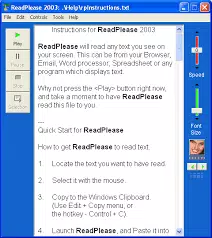
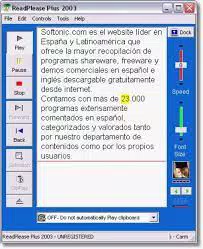
- Basic Playback Control: The app supports start, stop, and pause functions, allowing users to manage playback manually.
- Freeware Availability: The software is distributed at no cost, making it accessible to users seeking a no-fee TTS solution.
For example, a student could copy a research excerpt from a browser and use ReadPlease 2003 to listen to it while preparing a meal. Similarly, a professional might paste meeting notes into the app to review them hands-free. However, the lack of advanced features such as adjustable speech speed, pitch control, or pronunciation customization limits the app’s utility for users seeking a personalized experience. The absence of a fast-forward or skip-ahead function further reduces efficiency when navigating long passages.
Interface, UX & Performance
The user interface of ReadPlease 2003 appears minimalistic, with a single text input area and basic playback controls. The layout prioritizes functionality over aesthetics, reflecting the design standards of early 2000s software. Navigation is straightforward: users paste text, click play, and listen. The app does not include menus, toolbars, or additional settings, which simplifies the user experience but also restricts customization.
Although the developer did not list formal performance metrics, the app’s small file size of 2.7 MB suggests it is lightweight and likely runs efficiently on low-resource systems. However, its performance on modern Windows environments remains unverified. The app may experience compatibility issues with current operating systems due to its age and reliance on legacy Microsoft speech technologies.
Responsiveness during playback appears to be consistent with its basic design, but the lack of real-time feedback or visual cues during speech (such as highlighting the current line) may hinder user orientation. Stability is not documented, and no reports of crashes or freezes were provided. Users should expect a static, no-frills experience with limited interaction points.
Platform Compatibility & Technical Requirements
ReadPlease 2003 is designed for the Windows platform. The application’s file size is 2.7 MB, indicating a compact footprint suitable for older or low-storage devices. The version number is 2003, and the release date is January 1, 2003, suggesting it was developed during the early days of widespread personal computing.
The developer did not specify minimum OS requirements, making it unclear whether the app is compatible with modern Windows versions such as Windows 10 or 11. It may require compatibility mode or legacy system support to function. Additionally, no information was provided about hardware requirements, driver dependencies, or supported Microsoft speech engine versions.
Users seeking to install the app should verify system compatibility before proceeding. While the app is available as freeware, its age raises concerns about security, stability, and long-term usability on current devices.
Pros and Cons
Pros
- Free to download and use with no licensing fees.
- Lightweight at only 2.7 MB, suitable for low-storage devices.
- Simple interface with minimal learning curve.
- Uses Microsoft speech engines, which are generally reliable for basic TTS.
- Supports clipboard-based text input for quick access.
Cons
- Limited to four voice options with no customization for pitch, speed, or pronunciation.
- Lacks fast-forward or skip-ahead functionality during playback.
- Cannot record audio output for offline listening.
- Outdated design and potential compatibility issues with modern Windows systems.
- Missing advanced features found in contemporary TTS tools.
FAQ
Is ReadPlease 2003 safe to download and install?
Yes, the app is distributed as freeware with no known malware or security threats. However, due to its age, it may not be compatible with current security protocols on modern systems.
Can I use ReadPlease 2003 on Windows 10 or 11?
Compatibility is not guaranteed. The developer did not specify minimum OS requirements. Users may need to run the app in compatibility mode or on an older system.
Does ReadPlease 2003 support multiple languages?
Specific language support was not listed. The app relies on Microsoft speech engines, which may include multilingual capabilities depending on installed language packs.
Can I adjust the reading speed or voice pitch?
No, the application does not provide options to customize speech speed, pitch, or pronunciation. Users are limited to the four built-in voices.
Is there a newer version of ReadPlease available?
As of the provided data, no updated version has been released. The app remains at version 2003 with no known successor or maintenance updates.
Final Thoughts
ReadPlease 2003 offers a basic but functional text-to-speech solution rooted in early 2000s technology. While its freeware status and minimal resource usage make it accessible, its lack of modern features significantly limits its practicality. Users seeking advanced customization, audio recording, or efficient navigation during playback will find it inadequate compared to current alternatives.
Despite its shortcomings, the app may still serve niche users who require a simple, no-cost TTS tool on legacy systems. For most modern users, however, more capable and feature-rich text-to-speech applications are available. The value proposition of ReadPlease 2003 lies in its simplicity and cost, but not in its functionality or long-term usability.
Download ReadPlease 2003 now


